The things that makes the BEAM great are its cheap and isolated processes, the ability to manage their lifecycles, and async message passing that works across a cluster. All these things were created for fault tolerance but give us concurrency for free.
But for most of the time that I've used Elixir, it's been awkward to see those processes - to visualize a live supervision tree, or to get something more helpful than a PID out of an error message.
A couple of years ago I wrote about process labels coming to Elixir. Process labels are a big help because you can use them liberally; they're not unique names for finding a process, just arbitrary labels for knowing what a process is. So you can say "this is a database connection" or "this is user 5 looking at the Foo page" or whatever is useful for you.
Since then, a lot has happened with labels. Process labels are now logged in GenServer crashes. ExUnit tests are now labelled with the test name, and libraries like ecto, postgrex, and bandit have labelled their internal processes (I've helped a little with this).
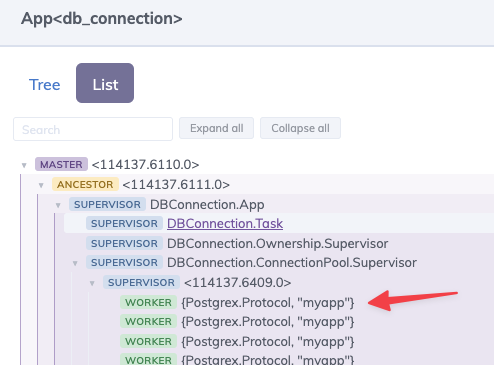
As of the recent 0.9.0 release, Phoenix LiveDashboard displays processes labels and includes a searchable nested list view of application processes, which you can search by name or label.
So now you can now look in Phoenix LiveDashboard -> Applications -> db_connection and see something like "these are the connections in my database pool".
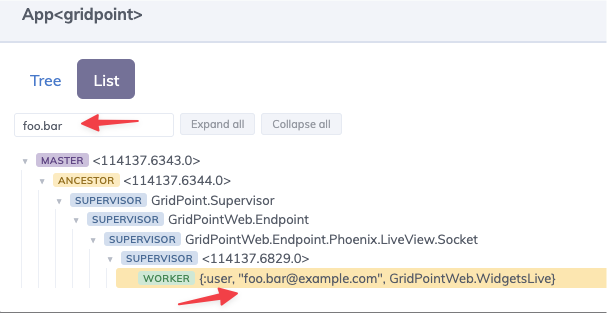
Or if you click on your own application instead of db_connection, you can search by process label. In the screenshot below, I've added Process.set_label({:user, user.email, socket.view}) to an :on_mount so that every LiveView is labelled with its name and the user who is viewing it. That lets me search by the name of a LiveView or the email address of a user and find any matching processes. (Assuming I've selected the correct node in the cluster.)
This is awesome! 🎉
Three takeaways:
- Library authors, if your library starts processes, please label them! This enables better error messages and better understanding of your supervision structure.
-
Application authors, process labels can help you with debugging and general understanding. Use them! Use
Process.set_label/1in all the places where you set up LiveViews, channels, GenServers, and other important processes in your application. - Anytime you see an error message that gives you a PID and you have no idea what that process was, ask yourself - could I get that process labelled or get that error message to show the label?
The better we can understand and debug our applications, the better things we can build.
Label your processes!